Table Of Contents
In today's crowded digital landscape, standing out is more challenging than ever. Your brand identity is your most valuable asset, but how do you ensure it shines in 2026?
This guide shows you how to use a template brand approach to build a strong and consistent identity that truly resonates. We will explore why brand guides matter, what elements to include, step-by-step template setup, best practices for the coming years, and how to keep your brand strong as trends evolve.
Ready to future-proof your brand? Let’s get started.
Why a Template Brand Guide is Essential in 2026
In 2026, standing out requires more than a memorable logo or catchy slogan. Brands need a clear, reliable system to maintain consistency and trust. This is where a template brand guide steps in as a strategic asset, helping your business rise above digital noise and rapid market changes.

The Evolving Branding Landscape
Today’s digital-first world is more competitive than ever, with brands fighting for attention across countless channels. Consumers expect seamless experiences wherever they encounter your brand. In fact, research shows that brand consistency boosts revenue by 23%, making it a non-negotiable priority. A template brand guide ensures your visuals and messaging remain recognisable, no matter where your audience finds you.
Benefits of Using a Template Brand Guide
A template brand guide streamlines how you create, manage, and share brand assets. With a centralised system, teams and partners can quickly access the latest logos, colour codes, and messaging frameworks. This not only saves time but also reduces costly errors. By using a template brand approach, you support rapid scaling and make onboarding for new staff or agencies much smoother.
- Streamlined asset creation and sharing
- Fewer mistakes in brand presentation
- Faster onboarding for new team members
A strong template brand guide builds efficiency into every creative process.
Common Branding Challenges Solved by Templates
Many businesses struggle with inconsistent visuals or messaging, especially when moving fast or growing quickly. A template brand guide solves these issues by providing clear standards for everyone to follow. This prevents confusion for your audience and stops brand dilution when new products or campaigns launch.
Whether you are onboarding new staff or expanding into fresh markets, a template brand guide keeps your identity cohesive and your communications on track.
Future-Proofing Your Brand Identity
A template brand guide is not static; it evolves as your business and the market change. You can easily update guidelines to reflect new trends, platforms, or accessibility requirements. Digital tools and cloud storage make it simple to edit and share updates instantly, ensuring your documentation always matches your brand’s current reality.
For example, platforms like Canva empower rapid updates and distribution, supporting your brand’s agility in a fast-moving landscape.
Who Should Use a Template Brand Guide?
A template brand guide is invaluable for startups, SMEs, agencies, and established brands alike. It offers efficiency for teams scaling their efforts, keeps quality high, and supports expansion into new markets. If your business wants to stay relevant and recognisable in 2026, adopting a template brand guide is a smart, future-ready move.
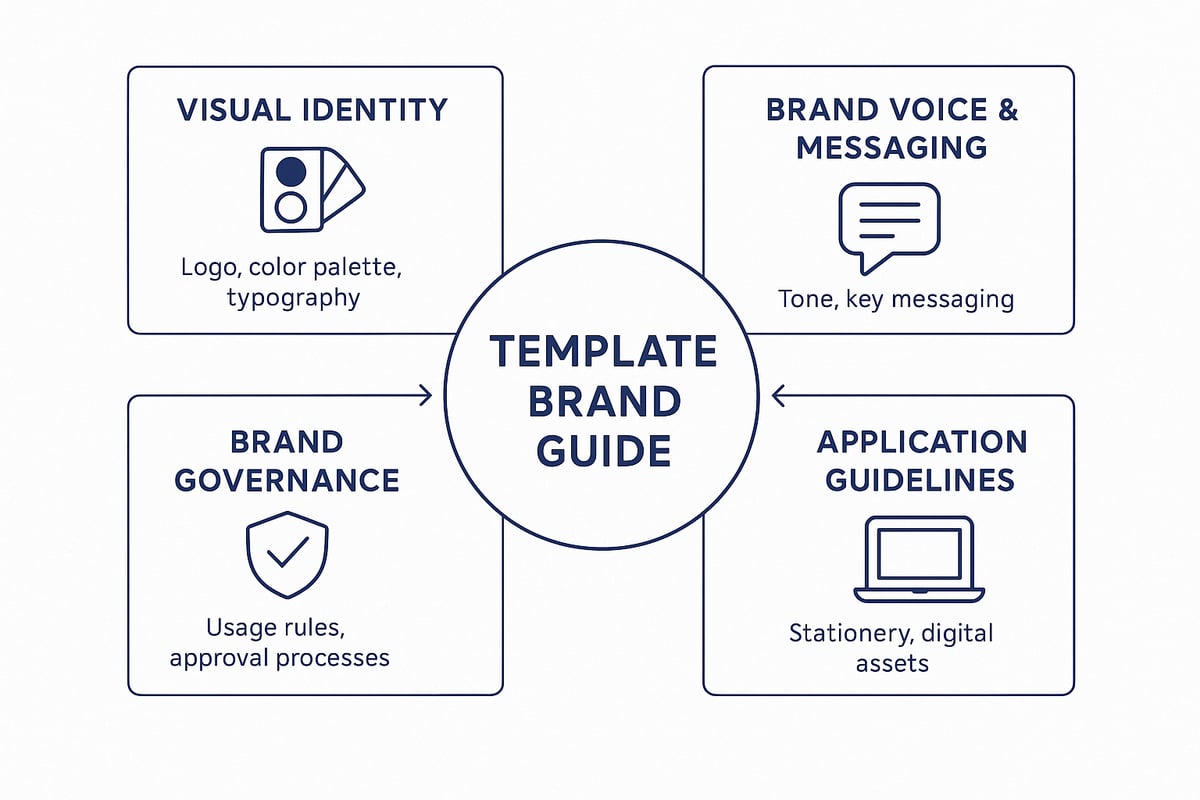
Core Components of a Modern Brand Guide Template
A modern template brand guide is the backbone of a cohesive, recognisable identity. Whether you are a startup or a global organisation, getting the core components right ensures your brand speaks clearly and consistently across every touchpoint.
Visual Identity Elements
Visual identity forms the visual DNA of your template brand. Getting these details right is essential for recognisability and trust. Your guide should include:
- Logo usage: primary and secondary logos, clear space, incorrect usage.
- Colour palette: hex codes, CMYK and RGB values, usage ratios.
- Typography: font families, hierarchy, web-safe alternatives.
- Imagery: photography style, iconography, illustration guidelines.
For instance, Canva’s templates provide editable brand boards, allowing you to adjust logos and colours easily. Defining these elements within your template brand ensures every asset is visually aligned. For deeper insight into how identity and logo design work together, see brand identity and logo design.
Brand Voice and Messaging
A template brand needs a clear, consistent voice that resonates with its audience. This section covers:
- Mission, vision, and values statements.
- Tone of voice: formal, conversational, playful, or industry-specific.
- Messaging pillars: key themes or promises your brand stands for.
- Example taglines and slogans.
A strong template brand guide offers prompts and examples, so teams can create on-brand copy for every channel. Real-world guides, like those from Boring Studios, include ready-to-use messaging frameworks, making it easier to maintain a unified presence.
Application Guidelines
Translating your visual and verbal identity into real-world assets is crucial. Application guidelines in your template brand guide should specify:
- Business cards, presentations, social posts, merchandise.
- Mockups and usage scenarios for each channel.
- Digital asset requirements for web and email.
These details help your team and partners apply the template brand across all touchpoints, reducing confusion and ensuring consistency. Including sample mockups and layouts within your template brand guide saves time and prevents costly missteps.
Accessibility and Inclusivity
By 2026, accessibility is non-negotiable for any template brand. Your guide should address:
- Colour contrast and legibility standards for all visuals.
- Inclusive language and imagery recommendations.
- Stat: 71% of brands update guides for accessibility by 2026.
Ensuring your template brand meets accessibility standards like WCAG makes your brand welcoming to all. Consider adding notes on inclusive practices, so everyone using the guide understands the importance of representation and readability.
Brand Governance and Usage
Maintaining the integrity of your template brand requires clear governance. This section should outline:
- Approval processes for new assets and campaigns.
- Contact points for brand questions or clarifications.
- Licensing and permissions for fonts, images, and templates.
When everyone knows the rules and where to go for help, your template brand remains strong and unified, even as your team grows or changes. Documenting these processes in the guide streamlines onboarding and supports ongoing brand health.
Step-by-Step: How to Create and Customise Your Template Brand Guide
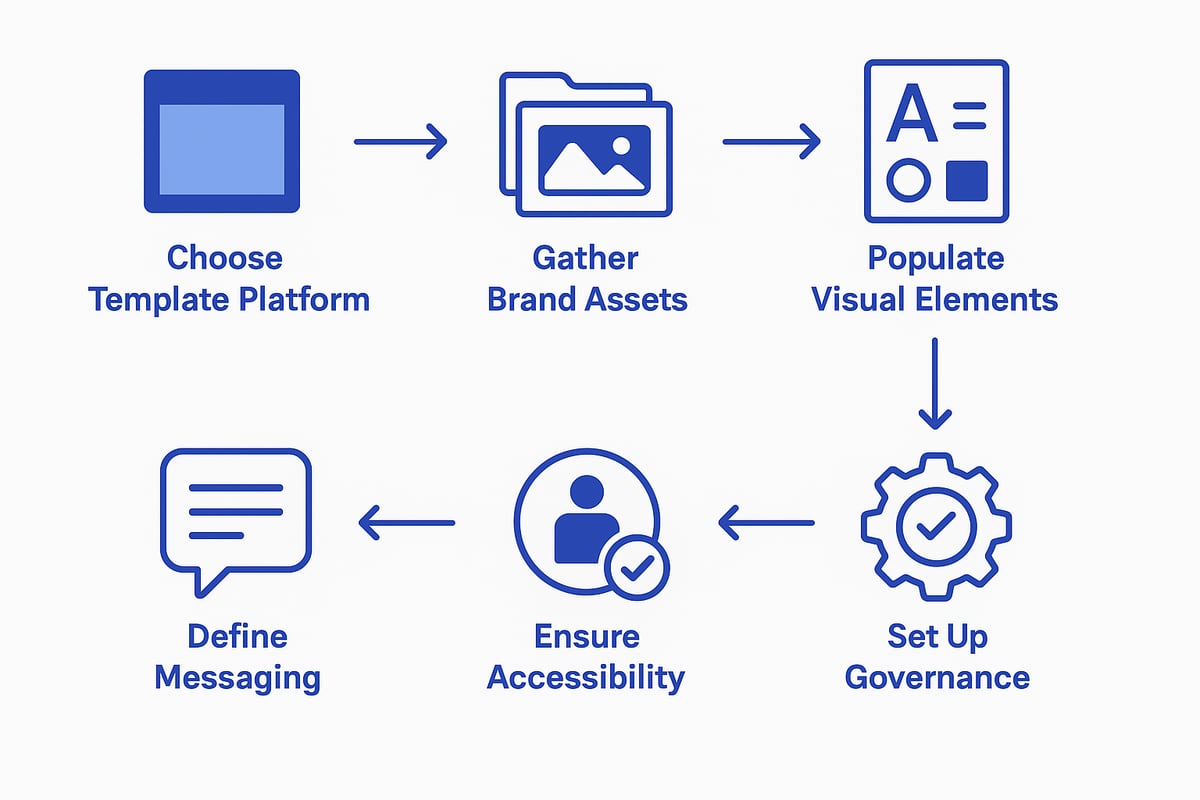
Building a consistent brand identity starts with a clear, actionable process. The following steps will help you templatize your brand, ensuring every detail is documented and ready for growth. By following this roadmap, you will streamline your workflow and set your business up for long-term recognition.
Step 1: Choose the Right Template Platform
Selecting the most suitable platform is the foundation of your template brand journey. Consider platforms like Canva, Adobe Illustrator, InDesign, or Figma, as each offers unique strengths for different needs.
- Canva is user-friendly and ideal for cross-team collaboration.
- Adobe Illustrator and InDesign provide advanced design control.
- Figma excels for collaborative, real-time editing.
Assess what your team needs most: design flexibility, easy sharing, or advanced features. Make sure your chosen platform supports exporting in the formats your stakeholders require. The right template brand platform will make updates and sharing seamless, reducing friction as your brand evolves.
Step 2: Gather Core Brand Assets
Centralise all your essential brand elements before diving into your template brand guide. These assets include:
- Logo files in various formats (SVG, PNG, JPG).
- Colour codes for print and digital (HEX, CMYK, RGB).
- Font files and licensing information.
- Imagery, icons, and graphic elements.
- Existing brand collateral such as brochures or presentations.
Use a cloud storage system or a digital asset management tool to keep everything organised. This central hub ensures that everyone working on your template brand has instant access to the latest files, reducing errors and saving time.
Step 3: Populate Visual Elements
Now, bring your visual identity to life in your template brand guide. Start by inserting your primary and secondary logos, specifying minimum size and clear space requirements. Define your colour palette with usage ratios and provide exact codes.
- Set typography rules, including headings, body text, and web-safe alternatives.
- Outline imagery guidelines, such as style, tone, and approved iconography.
- Include sample layouts for key applications like social media or business cards.
Use real examples as placeholders so your template brand remains practical and easy to update as your business grows.
Step 4: Define Messaging and Tone
A strong template brand guide documents not just how your brand looks, but how it sounds. Write clear mission, vision, and value statements. Set the tone of voice—whether formal, conversational, or playful—so your team knows how to communicate consistently.
- Identify messaging pillars and provide sample taglines.
- Offer prompts to help writers and designers stay aligned.
- Include examples for web, print, and social channels.
This clarity ensures your template brand identity resonates across every touchpoint, from emails to advertising campaigns.
Step 5: Establish Usage and Application Rules
To maintain consistency, your template brand guide must include specific application guidelines. Create mockups for business cards, presentations, social posts, and merchandise.
- List do’s and don’ts for asset usage.
- Provide editable templates for common use cases.
- Outline digital asset requirements for websites and emails.
This section empowers teams to apply the template brand correctly, preventing off-brand visuals and messaging during growth or product launches.
Step 6: Ensure Accessibility and Inclusivity
Modern template brand guides prioritise accessibility and inclusivity. Test your colour contrast and font sizes to meet readability standards. Add notes on using inclusive language and imagery.
- Reference accessibility guidelines, such as WCAG.
- Encourage diverse representation in photos and illustrations.
For businesses seeking future-proof solutions, consider using AI tools automate style guide creation to streamline updates and ensure your template brand remains compliant and relevant as standards evolve.
Step 7: Set Up Governance and Distribution
Protect your template brand by defining clear governance processes. Specify approval workflows for new assets and set a schedule for regular updates.
- List contact points for brand-related questions.
- Store the guide on a secure, accessible platform like cloud storage or your company intranet.
- Track who has access and maintain version control.
This structure ensures your template brand guide stays current, centralised, and easy for everyone to use.
Tips for Effective Customisation
- Use prompts, examples, and how-to guides within your template brand guide.
- Tailor the guide to your industry and audience for maximum relevance.
- Schedule regular updates to reflect your brand’s evolution.
By following these steps, you will create a flexible, user-friendly template brand guide that supports your business now and into 2026.
Template Brand Guide Best Practices for 2026
Creating a future-ready template brand guide means more than just filling in logos and colours. To stay ahead in 2026, your approach must be digital-first, adaptable, and engaging for teams. Let us break down essential best practices that ensure your template brand sets the standard for consistency and growth.
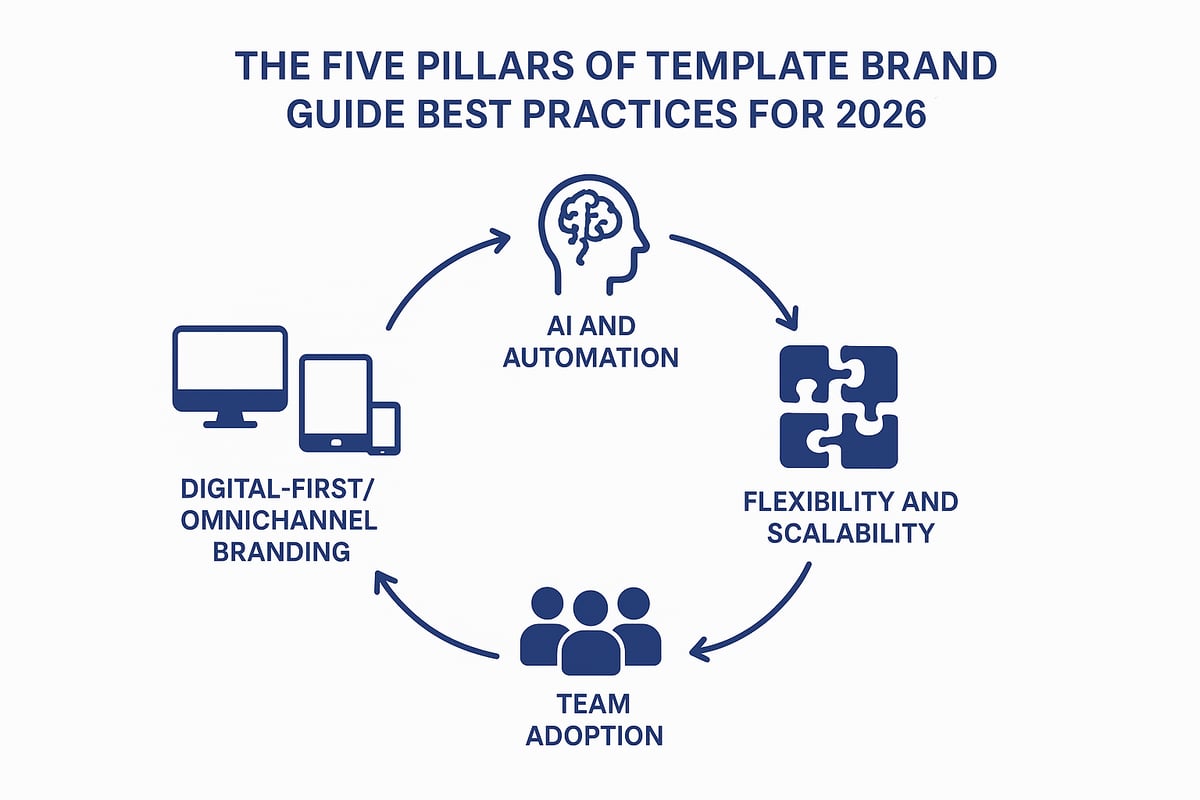
Embracing Digital-First and Omnichannel Branding
A modern template brand guide must operate seamlessly across every digital touchpoint. From websites to mobile apps, and from social feeds to print, your brand assets need to adapt without losing identity.
- Include logo variations for web, mobile, and print
- Specify responsive colour palettes and typefaces
- Provide clear usage for social media and email templates
By ensuring your template brand guide addresses omnichannel needs, you make it easier for your team to deliver a unified presence everywhere. This approach not only improves recognition but also speeds up content creation for new platforms.
Leveraging AI and Automation
AI is rapidly transforming how brands manage assets and messaging. Embedding automation into your template brand guide means you can keep up with the pace of digital change.
- Use AI tools for on-brand content generation
- Automate asset distribution and version control
- Set up monitoring to flag off-brand usage
Leading brands now rely on AI to ensure their template brand assets remain consistent, even as platforms and formats evolve. This allows teams to focus on strategy while technology handles repetitive tasks.
Keeping Your Guide Flexible and Scalable
A rigid template brand guide can quickly become outdated. Flexibility is key for adapting to new products, campaigns, and market trends.
- Design modular layouts for easy updates
- Leave placeholders for future channels or asset types
- Provide instructions for customising elements
Brands that build scalability into their template brand guides can pivot faster than competitors and integrate new ideas without confusion. Consider a table comparing fixed vs modular guide approaches:
| Feature | Fixed Guide | Modular Template Brand Guide |
|---|---|---|
| Update Speed | Slow | Fast |
| Adaptability | Low | High |
| Ease of Use | Moderate | High |
Encouraging Team Adoption and Engagement
Even the best template brand guide will fail if your team does not embrace it. Make the guide accessible, practical, and interactive to boost adoption.
- Offer training resources and how-to videos
- Use real-life examples for each application
- Schedule live workshops or Q&A sessions
When your template brand guide is user-friendly and supported by training, team members are more likely to follow it. This leads to fewer mistakes and a stronger, more consistent brand identity across all channels.
Regular Review and Iteration
Continuous improvement is essential for a template brand guide that stands the test of time. Schedule regular audits and collect feedback to identify gaps and opportunities.
- Review visuals, messaging, and accessibility quarterly or annually
- Gather input from all departments and stakeholders
- Update guides to reflect new trends, platforms, or legal requirements
Avoid common pitfalls by staying proactive. For a deeper understanding of mistakes to avoid, see these misconceptions about branding. By keeping your template brand guide current, you ensure it remains a valuable tool for your business.
Real-World Examples: Template Brand Guides in Action
In today’s competitive market, a template brand approach is no longer optional for businesses that want to stand out. Real-world examples show how leading companies use template brand resources to streamline branding, reduce errors, and scale efficiently. These practical case studies demonstrate the impact of a well-crafted template brand guide on identity, consistency, and business growth.
Case Study: Canva’s Customisable Brand Templates
Canva’s template brand tools have become an industry benchmark for accessible and flexible branding. Their editable brand boards and guideline presentations allow users to quickly adapt a template brand system for any industry, from fashion to hospitality. With drag-and-drop functionality, businesses can maintain consistency without design expertise.
Users benefit from features like pre-set colour palettes, font hierarchies, and asset libraries. For those seeking digital-first solutions, platforms like BrandPad trusted by IKEA and MoMA also illustrate how modern template brand tools enable global teams to collaborate seamlessly and keep branding unified across channels.
Case Study: Boring Studios’ Brand Presentation Template
Boring Studios offers a comprehensive template brand presentation with 28 customisable pages, practical prompts, and how-to guides. This makes it easy for both non-designers and professionals to set up a consistent identity. User feedback highlights the immediate impact: “Easy to adapt and came through immediately” (Paul Groves, 2025 review).
The template brand structure covers everything from logo usage to messaging, helping businesses avoid the confusion of inconsistent materials. By using a template brand approach, teams can onboard new staff faster and ensure every project reflects the brand’s core values.
Industry-Specific Templates
Template brand systems are not one size fits all. Leading providers have developed industry-specific templates to meet unique needs:
| Industry | Template Brand Features |
|---|---|
| Fashion | Minimalist layouts, trend-forward colour palettes |
| Food & Beverage | Playful graphics, retro-inspired typefaces |
| Agencies | Client-ready presentations, onboarding checklists |
A template brand tailored for each sector ensures relevance and authenticity. By selecting the right template brand, a business can better connect with its audience and streamline rollout across platforms.
Quantifiable Results and Lessons Learned
The results speak for themselves. Brands using a template brand guide save significant time and money—Boring Studios’ clients, for example, save over $3,000 per project in design time. Fast onboarding and a 4.7/5 average rating underscore the value of this approach.
However, the biggest lesson is the need for ongoing customisation and updates. Generic template brand solutions can lead to stagnation. Brands that regularly update their guides and prioritise access and training see better results. For more on building a unique identity, see these practical steps for establishing a unique brand.
Maintaining and Evolving Your Brand Guide Over Time
Building a template brand is only the beginning. To stay relevant and impactful, your brand guide must be maintained and adapted as your business and the market evolve. Treat your template brand as a living document, not a static file. By making regular updates and involving your team, you ensure your brand remains strong and consistent across every touchpoint.
Scheduling Regular Brand Audits
A template brand guide requires consistent review to stay effective. Schedule quarterly or annual audits to assess visuals, messaging, accessibility, and real-world applications. Involve cross-functional teams to gather diverse perspectives. Use a checklist to ensure nothing is missed:
| Audit Area | What to Review |
|---|---|
| Visuals | Logos, colours, fonts |
| Messaging | Tone, values, slogans |
| Accessibility | Contrast, readability |
| Application | Social, print, digital |
By auditing your template brand, you tackle issues before they impact your audience. This process keeps your identity aligned with business goals.
Updating for New Platforms and Trends
Digital environments shift rapidly. Update your template brand guide to include requirements for new social platforms, content formats, and devices. Stay ahead by monitoring industry trends and emerging technologies. For practical strategies on aligning your branding with digital evolution, see these web design and branding tips.
Consider:
- Adding guidelines for new platforms like Threads or evolving video formats
- Refreshing imagery and language to reflect cultural shifts
- Reviewing technical specs for responsive design
Regular updates ensure your template brand is future-ready and competitive.
Training and Onboarding New Team Members
Effective onboarding embeds your template brand into the culture. Integrate brand guide training into new hire orientation through video tutorials, workshops, or Q&A sessions. Outline clear steps for accessing and using the guide:
- Provide login details or links to the template brand guide
- Assign a mentor or point of contact for brand questions
- Offer sample projects for hands-on practice
Teams with formal onboarding adopt the template brand 30% faster, ensuring consistency from day one.
Gathering and Implementing Feedback
Continuous improvement starts with feedback. Set up channels for staff and partners to share insights on the template brand guide. Use anonymous surveys, suggestion boxes, or regular review meetings.
A feedback loop can look like this:
- Collect input from users
- Review suggestions with brand leads
- Prioritise updates based on impact
- Communicate changes to all stakeholders
Brands with active feedback processes maintain higher template brand consistency and relevance.
Ensuring Accessibility and Compliance
Keep your template brand guide compliant with evolving accessibility standards and legal requirements. Monitor updates to WCAG or local laws and adjust guidelines as needed.
Checklist for accessibility:
- Test colour contrast and font sizes
- Use inclusive imagery and language
- Document licensing for all assets
By prioritising accessibility, your template brand becomes more inclusive and meets the needs of all users.
As you’ve seen, building a strong and consistent brand identity in 2026 isn’t just about looking good—it’s about standing out in a fast changing digital world and making a real impact on your business growth. Whether you’re launching a new venture or refreshing your established brand, having a tailored brand guide sets you up for clarity, efficiency, and success. If you’re ready to create a brand identity that truly resonates and drives results, I’m here to help you get started—let’s bring your vision to life together.
Start your project